 BarbellForm
Loading the bar
Every barbell set shows the plates to put on each side. They come from the bar and plates you tell the app about, so you never get a weight you can’t build.
-
Tell it what you have
In Settings, under Bar and plates, tap Edit bar and plates. Set the bar’s weight, your collars if you use them, and how many pairs of each plate you own. Dumbbells have their own list just below.
Each plate shows in its usual colour for its size. If your gym’s 15s are yellow and yours are black, you can change that too.
-
Read it off the set
Today and the logger write the load under each barbell set: “20 kg bar + 25 per side”. Weights are rounded to what your plates can make, so the number on screen is always one you can load.
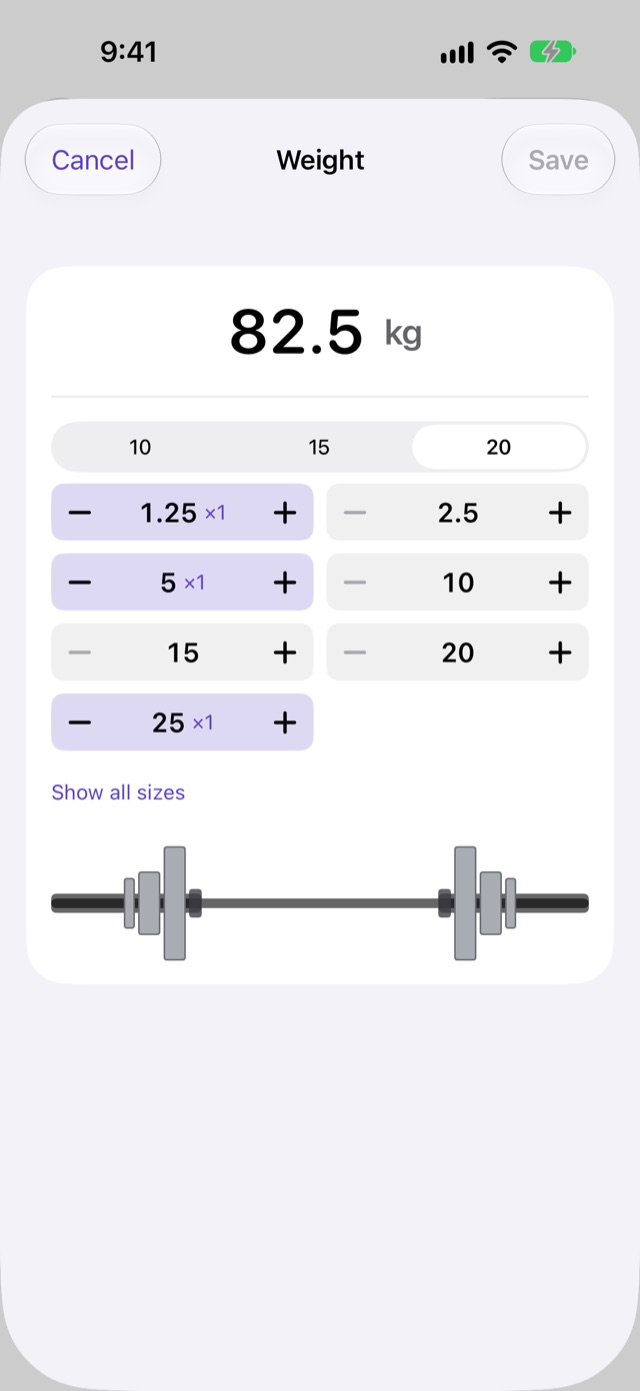
Tap the weight tile in the logger’s pane to see the plate sheet: the bar, and the plates on each side in the order they go on.
-
Change the weight
In the plate sheet, add or take off a plate on each side. Show all sizes offers every usual plate, for a gym that has more than you do at home; Only my plates goes back to yours.
When you save, the app asks whether the new weight is for This set only or for this set and the later open sets of the exercise. On straight sets, changing a work set’s weight carries to the sets after it at the same weight.
The sheet remembers the bar and plates you loaded, so the next set opens on them.
Next: Why this weight